|
| Top | Business Info | Data | Customers | Labels | Letters | Reports | Tools |
Managing your Reports
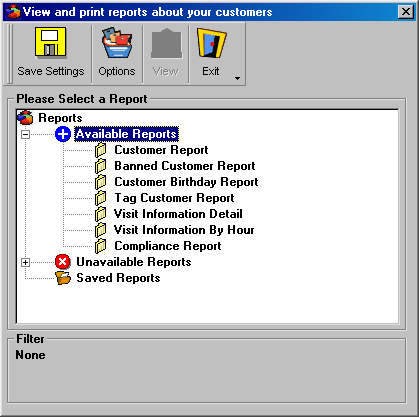
Reports are a powerful feature of IDVerify that let you view information about your customer database. If you show the report screen from the Customer Detail screen, IDVerify will use the Filtered recordset for your reports. If you show the Report screen from the Main Screen, IDVerify will report on all customers in the customer database.
Toolbar Options
Save
Save all report settings (future feature).View
View your reports in print-preview mode.Exit
Clicking Exit exits the Report screen.Form Settings
Please Select a Report
Clicking + or - navigates through the report structure.
*Best Viewed with Internet Explorer v.4+
Besides Credit card other payment methods available from Shopping Cart
We ship worldwideHOME
ID-e Age Verifier
Toll Free 1-866-547-8507
Phone 310-547-8501Copyright©All Rights Reserved
Contact us